
- 1Browse
- 2Buy
- 3Warehouse
- 4Submit parcel
- 5Pay shipping
- 6Delivered
- 7Confirm Receipt
Superbuy shipping discount stack calculator
Member discount, one coupon and credits applied in the order the help centre describes, with the growth value and credits the parcel earns once confirmed.
Enter a parcel and read each step
Enter what the parcel page shows. Every figure stays in your browser. Amounts are in yuan because Superbuy prices shipping in yuan before converting.
Feeding the calculator from a real parcel page
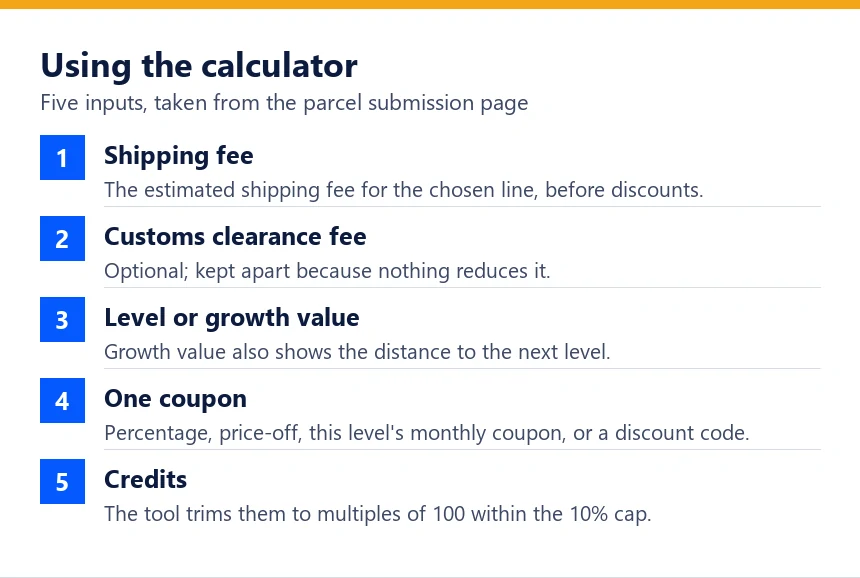
How to use this tool in practice: open the parcel submission page in your Superbuy account and note the estimated shipping fee for the line you picked. Enter it as the shipping fee. If a customs clearance fee is listed, add it in its own box so it is kept out of the discounts.
Choose your level, or type the growth value shown on your VIP page if you want to see the distance to the next level. Then pick at most one coupon, exactly as at checkout, and type the credits you hope to spend.
The steps under the form show each reduction in order. A red line means a rule stopped something from applying: a minimum not met after the member discount, a credit amount trimmed to the cap, or credits blocked by a discount code.
What the calculator assumes and leaves out
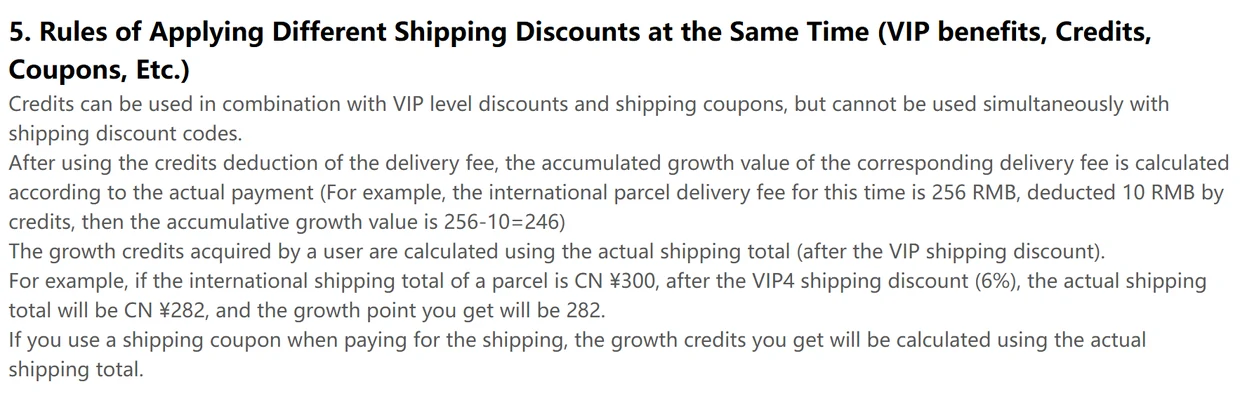
It rounds each monetary reduction to the nearest fen as a model assumption; the screenshot in article 1450 does not establish a universal rounding method. It rounds credits earned down to the whole yuan, following the 138.80 example. It applies credits after the coupon and measures the 10% cap on the amount left to pay.
It cannot price a shipping discount code because codes vary. Choosing one switches credits off and shows a subtotal before the unknown code; it does not calculate final payment or rewards. It ignores value-added services and insurance, which sit outside the shipping fee base.
It doubles growth value, not credits, for a parcel submitted in your birthday month, because only the growth value rule mentions doubling. And it treats the counter as cumulative, which the help centre implies but does not state.
Test cases that match the operator's numbers
Before publishing, the calculator was run against every worked number in the help centre that it can reproduce. The table lists the inputs and the results it gives.
| Case | Inputs | Operator's figure | Calculator |
|---|---|---|---|
| Help 1428, discount coupon | VIP1, CN¥500, 20% coupon | CN¥396 paid | CN¥396.00 paid |
| Help 1428, price-off coupon | VIP1, CN¥500, CN¥50 off CN¥300 | CN¥445 paid | CN¥445.00 paid |
| Help 1450, VIP discount | VIP4, CN¥300, no coupon | 282 growth value | 282 growth value |
| Help 1450, credits | VIP0, CN¥256, 1,000 credits | 246 growth value | 246 growth value |
| Help 1450, screenshot | VIP1, CN¥27 plus CN¥8 customs, 100 credits | CN¥0.27 VIP discount | CN¥0.27 discount, CN¥33.73 paid |
The numbers behind each step are explained on their own pages.